Installing your Interface Card and Software
1. Install your Interface Card
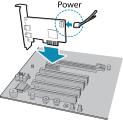
|
Ensure the card is installed per the manufacturer's instructions. Connect the internal IDE or SATA power connector on the card to the computer power supply. Alternatively, use your PC's built-in host controller, if equipped. |
Open the Windows Device Manager. Ensure the card is properly installed.
2. Install the Spinnaker® SDK Software
Note: For existing users who already have Spinnaker installed, we recommend ensuring you have the latest version for optimal performance of your camera. If you do not need to install Spinnaker, use SpinView to install and enable drivers for your card. The Forge-IP camera requires Spinnaker version 4.0 or later.
- Go to the Spinnaker SDK Download page. If you are not already logged in, you are prompted to login.
- Click the Download Now button.
- Select your operating system and version.
- After download is complete, open the file to start the Spinnaker setup wizard.
- Follow the steps in each setup dialog.
3. Optimize the settings of your Ethernet card
- In StartÒTeledyne Spinnaker SDKÒSpinView, right click on the Network Adapter and select Adapter Configuration. The Adapter Config Utility lists your network adapters and allows you to access the following:
- Adapter IP address
- Subnet mask
- Default gateway
- Receive buffers
- Transmit buffers
- Jumbo packets
- RSS
- Media optimization
- CPU affinity
|
|
|
|
Note: See How to Optimize GigE Network Adapter Settings for more information on configuring for best performance.
